
Museums today are dynamic, experience-driven destinations competing for attention across crowded digital channels. At the same time, marketing and development teams are juggling limited staff, tight budgets, and growing expectations around engagement, revenue, and reporting.
That’s where museum marketing automation becomes essential.
The right system allows your team to nurture visitors, convert ticket buyers, retain members, and steward donors without adding hours of manual work. Instead of reacting to every campaign, you build repeatable processes that support the full visitor journey. HubSpot for Nonprofits gives museum teams practical tools to streamline communication, strengthen relationships, and run more effective campaigns across the full visitor lifecycle.
Before diving into specific automations, it helps to understand how your current tools are really performing. If you’re unsure whether your tech stack is supporting your goals, our Check My Tech quiz offers a quick way to assess where you stand. 👉 Take the Quiz Now
Now let’s dig in. In this blog, we’ll cover eight HubSpot automations your museum can use right now to elevate your next marketing campaign, from increasing ticket sales to strengthening donor engagement and improving membership retention. 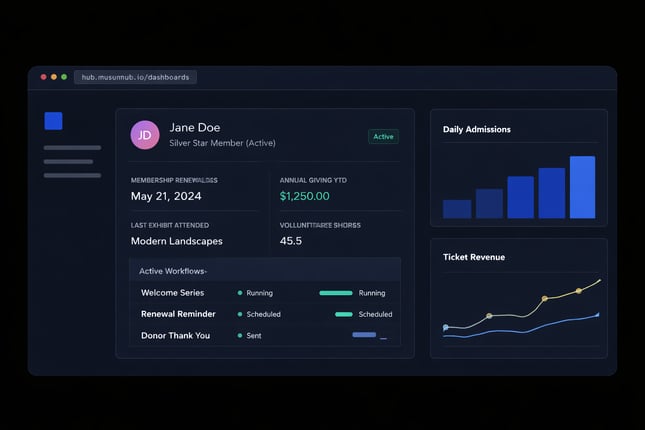
1. Welcome Series for New Subscribers
What It Does: Automatically sends a series of onboarding emails when someone subscribes to your newsletter or mailing list.
Why It Matters: First impressions are everything. Use this automation to introduce your museum, share its mission, and highlight upcoming events or popular exhibits.
Example Workflow:
- Day 1: “Welcome to [Your Museum Name]! Here’s What You Can Look Forward To”
- Day 3: “Upcoming Events You Won’t Want to Miss”
- Day 7: “Explore Our Collection: Top Picks from Our Visitors”
2. Event Registration Follow-Up
What It Does: Sends confirmation emails, reminders, and post-event thank-you notes to attendees after they register for an event.
Why It Matters: Clear communication improves the attendee experience and ensures higher participation rates.
Example Workflow:
- Registration: Send a confirmation email with event details.
- 3 Days Before the Event: “Reminder: Your Event is Coming Up!”
- Post-Event: Send a thank-you email with follow-up resources or links to future events.
3. Membership Renewal Reminders
What It Does: Triggers a series of emails leading up to a member’s renewal date, with links to renew their membership online.
Why It Matters: Retaining members is more cost-effective than acquiring new ones. This automation helps keep your membership base stable.
Example Workflow:
- 30 Days Before Expiration: “Renew Your Membership Today and Don’t Miss a Thing!”
- 7 Days Before Expiration: “Your Membership is About to Expire—Stay Connected!”
- Day of Expiration: “It’s Not Too Late to Renew Your Membership”
Impact: Reduces membership churn and ensures a steady stream of revenue.
4. Abandoned Ticket Purchase Recovery
What It Does: Identifies visitors who started buying tickets but didn’t complete the purchase, then sends follow-up emails to encourage them to finish.
Why It Matters: People get distracted. A well-timed nudge can recapture these lost sales opportunities.
Example Workflow:
- 1 Hour After Abandonment: “It Looks Like You Left Something Behind!”
- 24 Hours Later: “Secure Your Spot Before It’s Too Late”
- 48 Hours Later: “Don’t Miss Out on This Experience”
Impact: Boosts ticket sales and ensures your events are well-attended.
5. Personalized Exhibit Recommendations
What It Does: Sends tailored recommendations for exhibits or events based on a visitor’s preferences, previous visits, or ticket purchases.
Why It Matters: Personalization drives engagement. Show visitors that you understand their interests and keep them coming back.
Example Workflow:
- Trigger: Visitor attends an art exhibit.
- Follow-Up Email: “Love Art? Check Out These Upcoming Exhibits!”
- Include links to book tickets or RSVP for related events.
Impact: Encourages repeat visits and deepens connections with your audience.
6. Donor Appreciation Updates
What It Does: Automatically sends a thank-you email after a donation, followed by updates on how their contribution is making an impact.
Why It Matters: Donors want to know their support matters. Keep them engaged by showing exactly how their funds are being used.
Example Workflow:
- Immediately After Donation: “Thank You for Your Generous Gift!”
- 30 Days Later: “Here’s How Your Donation is Making a Difference”
- 90 Days Later: Share a report or story highlighting their impact.
Impact: Builds trust and encourages repeat donations.
7. Visitor Feedback Collection
What It Does: Sends a survey to visitors after their trip to gather feedback on their experience.
Why It Matters: Understanding what works (and what doesn’t) is crucial for improving operations and visitor satisfaction.
Example Workflow:
- Trigger: Visitor checks in or buys a ticket.
- Post-Visit Email: “How Was Your Visit? We’d Love Your Feedback!”
- Include a link to a short survey or feedback form.
Impact: Provides valuable insights and demonstrates that you care about your audience’s opinions.
8. Birthday and Anniversary Greetings
What It Does: Sends personalized emails for birthdays or membership anniversaries, including special offers or discounts.
Why It Matters: Small gestures go a long way in making your audience feel valued.
Example Workflow:
- Birthday Email: “Happy Birthday! Celebrate with a Special Gift from [Your Museum Name]”
- Membership Anniversary Email: “Thanks for Being a Member for [X] Years! Here’s a Little Something for You.”
Impact: Strengthens loyalty and encourages continued engagement.
Taking Musuem Marketing Automation Further
Automation on its own can improve efficiency, but its real power shows up when it’s supported by thoughtful segmentation, connected systems, and clear reporting. For many museums, the challenge isn’t knowing what automations to build. It’s having the infrastructure to support them without creating more manual work behind the scenes.
Smarter segmentation allows museums to tailor communication based on visitor behavior, engagement history, membership status, or giving patterns. Instead of sending the same message to every contact, teams can deliver relevant outreach that reflects how someone actually interacts with the institution.
Dynamic lists ensure those audiences stay current automatically. As visitors attend events, renew memberships, make donations, or lapse in engagement, they move into the appropriate segments without staff needing to update records manually.
Integrations are what make this sustainable. When ticketing platforms, email tools, e-commerce systems, and donor data connect inside a shared CRM, marketing automation becomes accurate and actionable. Without those connections, teams are forced to reconcile spreadsheets, import lists, and piece together reports across multiple systems. Analytics then close the loop. With centralized reporting, museums can see which campaigns are driving attendance, renewals, and donations, and adjust their strategy based on real performance data rather than assumptions.
Where MuseumHub Fits In
For institutions looking to unify these efforts, MuseumHub, built on HubSpot, provides a connected foundation that brings ticketing, membership, donor engagement, and marketing automation into a single ecosystem. This allows automation to function as part of a broader visitor lifecycle strategy instead of a series of disconnected email sequences.
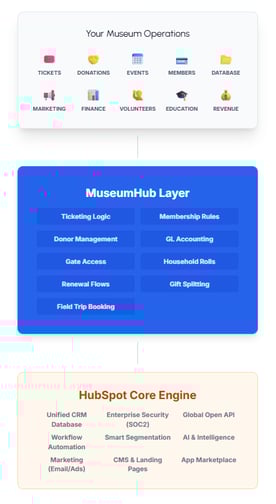
When segmentation, integrations, and reporting work together, museums move from reactive campaigns to proactive growth strategies grounded in data. Curious? Talk to us about MuseumHub.
|
Dive into our detailed case study on the MNHS transformation, and discover how your institution can achieve similar results:
|

Curious how HubSpot can transform your museum?
Nonprofit Tech Shop is one conversation away!
