
Let’s talk about the museum integration project that technically “worked.”
The systems are connected. The sync is live. The launch meeting went fine. Everyone got a reassuring implementation email.
Then, two weeks later, membership is asking why lapsed members received the wrong renewal message. Development is wondering why a donor’s recent event attendance never showed up in the CRM. Marketing is quietly rebuilding a segment in a spreadsheet because the dashboard “doesn’t look right.” Leadership asks for one simple number, and suddenly three departments are comparing exports like they’re decoding ancient tablets.
The part that gets overlooked is everything underneath the connection.
Which system creates the record? Which system updates it? Which fields should sync? Which team owns the data? What happens when two systems disagree? Who checks whether the integration still matches the way staff actually work six months later?
When those answers are unclear, the integration may technically be live, but the operation around it is fragile. Records duplicate. Reports conflict. Teams start second-guessing the dashboard. Eventually, the spreadsheet comes back because it feels more reliable than a system no one fully trusts.
The museums we work with usually do not need a more complicated tech stack. They already have that. They need cleaner integration logic, clearer ownership, and a CRM foundation that reflects the real constituent journey.
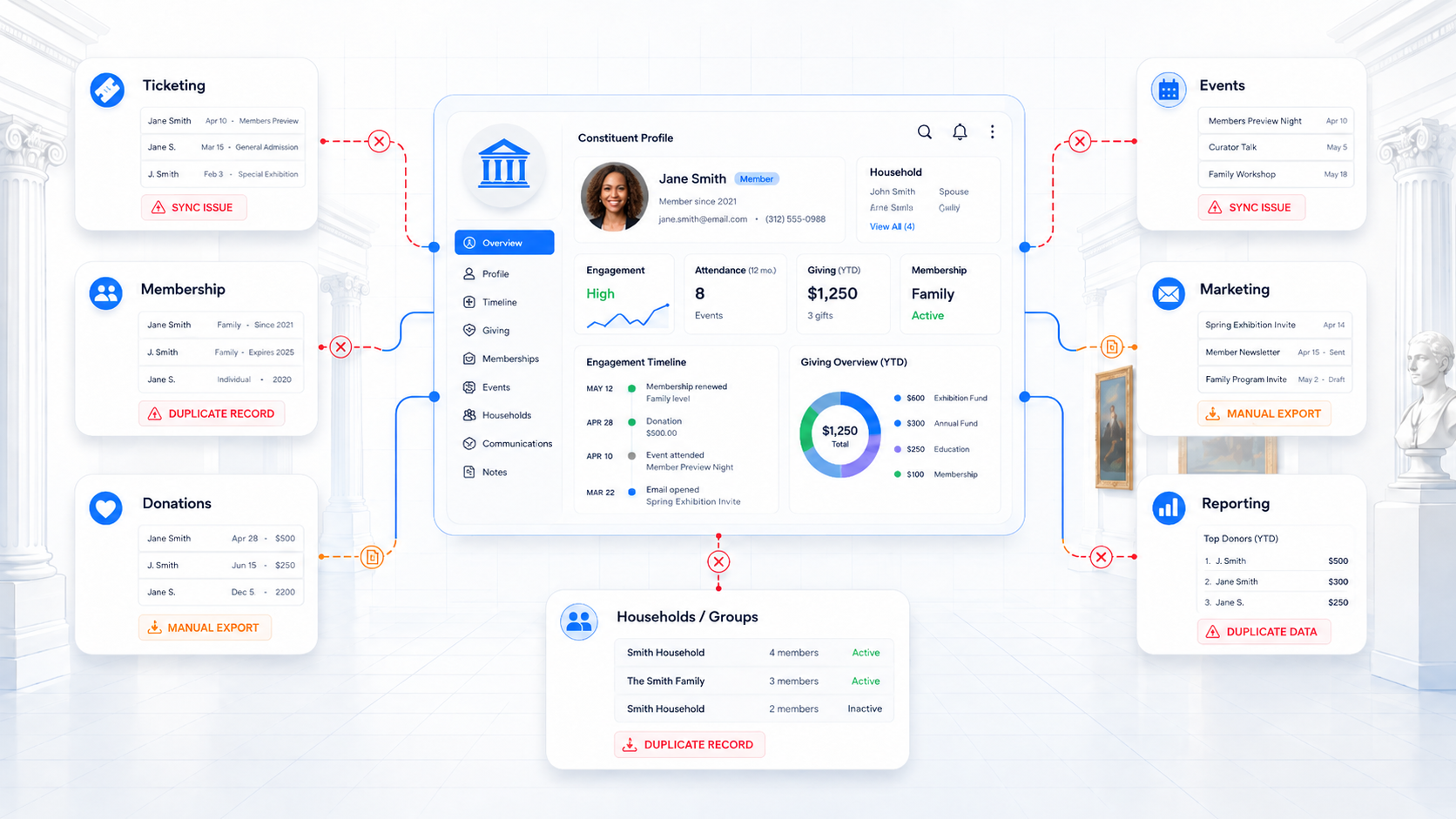
Below are the top 10 most common integration challenges, along with practical fixes that can help teams build a cleaner, more reliable foundation.
1. Constituent Records Do Not Match Across Systems
One of the first places museum integrations break down is identity resolution.
A single person can interact with the museum in several different ways: buying tickets, renewing a membership, making a donation, registering for a lecture, attending with a household, or participating through a school or organization. Across those touchpoints, the same constituent may appear under different emails, names, IDs, household records, or organizational relationships.
At smaller volumes, staff can sometimes catch those inconsistencies manually. At scale, they quickly become a reporting and engagement problem.
A member may look like a first-time visitor. A donor’s event history may be separated from their giving record. A household membership may not connect cleanly to individual attendance. A school contact may be duplicated across field trips, invoices, and email lists. The relationship is real, but the systems are not resolving it clearly.
The fix is to define matching logic before the integration goes live.
That means documenting:
- which identifier should be treated as the primary match key
- how external system IDs should map into the CRM
- when email should or should not be used for matching
- how household, school, company, and family relationships should be structured
- which system is allowed to create new records
- which system is allowed to update existing records
- how duplicates should be flagged, merged, or reviewed
For museums using HubSpot, this often means building a CRM structure where contacts, households, organizations, schools, members, donors, visitors, and event participants are modeled intentionally from the start. MuseumHub adds museum-specific data models that help organize those relationships in a way that reflects how museums actually operate.
Strong identity resolution gives every downstream process a better foundation. Reporting becomes cleaner. Segmentation becomes more accurate. Automation has fewer bad assumptions to work from. Staff can trust that when they open a constituent record, they are seeing the relationship more completely, not just one disconnected piece of it.
2. Ticketing Data Does Not Reach the Teams That Need It
Ticketing data is one of the clearest indicators of audience behavior, but it often stays too close to the point of transaction.
Admissions systems can show who visited, what they attended, how often they returned, whether they came as part of a household or group, and which programs or exhibitions generated repeat engagement. That information has value far beyond front-desk operations.
When ticketing activity does not flow into the CRM in a usable format, other teams lose important context. Marketing may build campaigns without knowing which audiences are actively visiting. Membership may miss signals that someone is ready to convert or upgrade. Development may not see that a donor recently attended a special exhibition, lecture, or private program. Leadership may struggle to connect attendance trends with membership, giving, or engagement outcomes.
The fix is to decide how ticketing data should support the broader constituent record.
That means defining which admissions data needs to sync, how often it should update, and how it should be structured once it reaches the CRM. Museums do not always need every transaction detail pushed into every workflow. They need the right activity data organized in a way that supports segmentation, reporting, automation, and relationship management.
Useful examples include:
- exhibition or program attendance history
- visit frequency over a defined period
- household or group attendance patterns
- member vs. non-member ticket activity
- paid vs. complimentary admissions
- event or program categories
- last visit date
- high-engagement visitor indicators
Once that information is structured well, teams can act on it more confidently.
3. Membership Data Is Treated Like a Transaction
Membership data often starts with the essentials: status, level, renewal date, payment history, and benefits. Those fields matter, but they rarely tell the full story of how a member engages with the institution.
A member may attend exhibitions, register for public programs, bring guests, donate during an annual campaign, respond to marketing emails, or participate in member-only events. In larger institutions, that activity may also involve household relationships, shared benefits, multiple contacts, school or corporate affiliations, and different engagement patterns across locations or departments.
When membership data sits apart from ticketing, donations, events, and communications, teams only see a narrow version of the relationship. Membership may know the renewal date, but not recent attendance. Development may see a gift, but not the member’s broader engagement. Marketing may send the same renewal message to every member, even when their behavior suggests very different needs or interests.
The fix is to build membership data into the broader constituent model. A stronger membership integration strategy should account for:
- membership status
- membership level
- renewal date
- household and family relationships
- shared benefits and associated contacts
- giving history
- ticket purchases
- event attendance
- program participation
- member communications
- discounts, access rules, and benefit usage
This gives teams a more complete view of the member relationship across the institution.
4. Donation Data Lacks Visitor Context
To understand the full donor relationship, development teams more than the donor’s transaction history.
A donor may also be a frequent visitor, member, event attendee, former volunteer, program participant, parent of a student, or contact at a sponsoring organization. In larger museum environments, those relationships often span multiple programs, departments, locations, and giving pathways.
When donation data sits apart from ticketing, membership, events, and marketing engagement, development teams lose important context. A supporter may look inactive in the fundraising platform while still attending exhibitions, opening campaign emails, renewing a membership, or participating in programs. Without that visibility, outreach can feel disconnected from the person’s actual relationship with the institution.
This is where donation integrations need to do more than move gift records from one system to another. They should help surface engagement signals that make donor communication more relevant and better timed. For example:
- a donor recently attended a gala, lecture, or exhibition opening
- a lapsed donor is still actively visiting or attending programs
- a member is showing signs of deeper engagement across departments
- a program attendee has responded to several fundraising campaigns
- a corporate sponsor is connected to field trips, events, or institutional partnerships
- a household includes multiple contacts with different giving and engagement patterns
The fix is to connect donation activity to the broader constituent record. For museums using tools like Fundraise Up, donation data can be connected into HubSpot so development teams can see giving history alongside visitor activity, membership status, event attendance, campaign engagement, and household or organizational relationships.
That context helps teams build more accurate donor segments, coordinate outreach across departments, and identify patterns that may not be visible from giving history alone.
5. Event Data Disappears After Registration
Museum events generate some of the clearest signals of constituent interest, but that data is often handled as short-term logistics.
Someone registers. Staff confirm attendance. A check-in list gets updated. A follow-up email goes out, maybe. Then the data stays behind in an event platform, form tool, spreadsheet, or department folder instead of becoming part of the broader constituent record.
That limits what teams can learn from participation.
A lecture attendee may also be a donor prospect. A family program participant may be close to becoming a member. A repeat event guest may be showing interest in a specific collection, program area, or location. A corporate contact may be connected to sponsorship, education, or private events. If that activity is not connected to the CRM, those patterns are easy to miss.
The fix is to treat event registration and attendance as part of the institution’s engagement history. At minimum, teams should be able to see:
- event registrations
- attendance status
- event type or program category
- payment status, when relevant
- member vs. non-member attendance
- household, school, company, or organization associations
- guest relationships
- follow-up communication history
- repeat participation across events or programs
When event data is structured this way, it stays useful after the event ends, and not disappear into the void of post-event spreadsheets. They should help the museum understand who is engaging, how often, and what their participation may signal next.
6. Reporting Breaks Because Teams Define Metrics Differently
In complex museum environments, different teams may rely on different definitions for the same metric. Admissions may report total ticketed entries. Membership may track active households. Marketing may look at individual contacts. Development may measure donors by gift date, while finance may reconcile revenue by deposit date.
None of those definitions are automatically wrong. The problem starts when those numbers are compared without a shared reporting framework.
That is how museums end up with reports that are technically accurate in isolation but difficult to reconcile across departments. Leadership asks for one number, and teams have to explain why attendance, membership, revenue, or engagement looks different depending on which system produced the report.
The fix is to define reporting logic before building dashboards. Museums should clarify:
- what counts as a visitor
- what counts as an active member
- how households and individuals are counted
- how donations are attributed
- how ticketing, event, and program attendance are categorized
- which system owns each metric
- how often each data source syncs
- which reports leadership needs regularly
- which definitions should be shared across departments
This is where integration strategy becomes operational governance. Even a well-built integration can produce confusing reports if teams do not agree on what the data means. Strong reporting depends on shared definitions, clear ownership, and source systems that staff understand well enough to trust.
7. Sync Direction Is Not Planned Carefully
A good integration plan does not treat every field, record, or update the same way.
Some data only needs to move into the CRM for visibility. Some data needs to move back into the source system. Some fields should update automatically. Others should be protected because a careless overwrite could create reporting issues, access problems, or communication mistakes.
For example, membership status may need to update from the membership system into the CRM so marketing can suppress renewal emails or trigger the right follow-up. Communication preferences may need to move from the CRM into a fundraising platform so development teams respect donor preferences. Attendance activity may only need to sync one way for reporting and segmentation. Financial fields may need tighter controls because they affect reconciliation and audit processes.
The fix is to define sync rules based on how teams actually use the data. For each integration, museums should document:
- which system creates the record
- which system updates the record
- which fields sync one way
- which fields sync both ways
- which fields should never be overwritten automatically
- what happens when two systems disagree
- which system wins during a conflict
- how often the sync runs
- who reviews errors or exceptions
Two-way syncing can be useful, but it should be used intentionally. When too many fields update in both directions without clear rules, teams risk accidental overwrites, duplicate updates, conflicting records, and data that becomes harder to trust.
8. Staff Stop Trusting the Data
This is one of the most important museum integration challenges because it affects how teams behave.
When staff see duplicate records, outdated fields, inconsistent reports, or missing activity, they start building their own backup systems. They keep personal spreadsheets. They track updates manually. They rely on memory. They ask the same few people to confirm information before acting.
At that point, the integration problem has become a trust problem. Even if the systems technically connect, teams may not use them confidently.
The fix is to build trust through data governance, not just integration.
That includes:
- clear ownership of key fields
- documented update processes
- regular duplicate management
- data validation rules
- staff training
- transparent reporting logic
- clear escalation paths when data looks wrong
A successful integration project is not only technical. It is behavioral. People need to understand where the data comes from, how it moves, what it means, and when they can rely on it. When staff trust the data, they are more likely to use the system. When they do not, the spreadsheets come back.
9. Integrations Launch Without Long-Term Ownership
One of the clearest signs of a struggling integration is not always a broken sync. Sometimes, it is a staff member quietly opening a spreadsheet because they do not trust what the system says.
That usually happens after enough small inconsistencies build up.
A record appears twice. A field looks outdated. A report does not match what another department sees. Event attendance is missing. Membership status looks wrong. A dashboard shows one number, while a team’s export shows another.
Eventually, staff start creating their own safety nets. They keep side spreadsheets, manually track updates, ask the same few people to verify information, or delay outreach until someone can confirm which record is correct.
At that point, the integration issue has become an adoption issue. The systems may technically be connected, but teams are no longer confident enough to rely on them.
The fix is to treat trust as part of the integration strategy from the beginning. That means building governance around how data is created, updated, reviewed, and explained. A stronger governance model should include:
- clear ownership of key fields and records
- documented processes for updates and corrections
- regular duplicate review
- validation rules for critical data
- transparent reporting logic
- staff training on how to read and use records
- escalation paths when data looks wrong
- routine checks to confirm integrations still match current workflows
When staff understand where the data comes from, how it moves, and who owns it, they are more likely to use the CRM as the working source of truth. When they do not, even the best-built integration can lose momentum because people will return to the tools they trust most, even if those tools are manual.
10. The Stack Was Built Around Tools Instead of the Constituent Journey
Many museum tech stacks were built through a series of reasonable decisions. Each choice likely solved a real need at the time. The challenge comes later, when the institution has to manage the full constituent relationship across systems that were never designed around the same operating model. That is how the Frankenstack takes shape.
The visitor journey crosses departments. A person may first engage through the website, purchase tickets, attend a program, become a member, bring their household to events, make a donation, respond to a campaign, or eventually connect through sponsorship, education, or advocacy. From the constituent’s perspective, this is one relationship with the museum. Internally, it may be split across several teams, tools, and records.
The fix is to map the constituent journey before adding or connecting more systems. Museums should look at how people engage across:
- first website visit
- ticket purchase
- exhibition or program attendance
- membership
- donation
- volunteer interest
- education programs
- household or group participation
- repeat visits
- major giving or sponsorship
- long-term advocacy
From there, teams can identify where data is created, where it needs to move, which systems should own it, and what staff need to see at each stage. A stronger museum integration strategy begins with the relationship model. The technology should support that model clearly enough for teams to understand the full journey, not just the individual transactions along the way.
How MuseumHub Supports a Stronger Museum Integration Strategy
After enough museum integration projects, the pattern becomes hard to miss. The tools are usually there for a reason. Ticketing has its own requirements. Membership has its own rules. Development needs giving history. Education teams manage field trips and group visits. Marketing needs segmentation. Finance needs clean reconciliation. Leadership needs reliable reporting across all of it.
The problem is what happens between those systems.
We built MuseumHub because we kept seeing sophisticated museum teams forced to manage complex operations through too many handoffs, too many exports, and too much institutional memory.
The Minnesota Historical Society is a clear example. MNHS operates 26 historic sites and museums across Minnesota, with 500+ staff and 1.2 million annual visitors. Before MuseumHub, their stack included Tessitura, Shopify, Drupal, VolunteerHub, and Excel, with staff managing manual exports, duplicate workflows, delayed reporting, and limited visibility across ticketing, membership, events, and engagement.
That is the kind of operational complexity MuseumHub was designed to support.
Built inside HubSpot, MuseumHub adds museum-specific architecture for admissions, memberships, ticketing, field trips, donations, engagement workflows, household relationships, and reporting visibility. It gives teams a clearer structure for how constituent data should live, move, and be used across departments.
For MNHS, that meant bringing ticketing and membership into HubSpot, syncing Shopify point-of-sale activity in real time, and giving staff one place to view purchases, attendance records, and membership interactions without manual uploads or overnight syncs.
That same architecture can help other museums make better integration decisions: which data belongs in HubSpot, which systems need to connect, where automation makes sense, where human review still matters, and how reporting should be structured across teams.
MuseumHub exists because museum operations are layered, specific, and too important to be forced into generic CRM logic. A stronger integration strategy starts with architecture that reflects the real work museums manage every day.